wordpressで、いまだにサイトヘルスステータスで推奨が出てるので、ImageMagickをインストールした。
作業はこちらのサイトhttps://www.kkaneko.jp/tools/ubuntu/imagemagick.htmlを参照。
下コードのように順に作業
sakae@:/tmp/ImageMagick$ sudo apt -y install build-essential gcc g++ make libtool texinfo dpkg-dev pkg-config
sakae@:/tmp/ImageMagick$ sudo apt -y install git
sakae@:/tmp/ImageMagick$ cd /tmp
sakae@:/tmp/ImageMagick$ rm -rf ImageMagick
sakae@:/tmp/ImageMagick$ git clone https://github.com/ImageMagick/ImageMagick
sakae@:/tmp/ImageMagick$ cd ImageMagick
sakae@:/tmp/ImageMagick$ ./configure --without-perl
sakae@:/tmp/ImageMagick$ make
sakae@:/tmp/ImageMagick$ sudo make install
sakae@:/tmp/ImageMagick$ make check
取り敢えずエラーが出ずにインストール終了。
それでも、サイトヘルスステータスでは変化がないので、別のサイトhttps://webjin.work/ubuntu-install-imagemagick/を参考に再インストール。
root@:/etc/php/7.4/apache2# apt install imagemagick
root@:/etc/php/7.4/apache2# apt install libmagickwand-dev
root@:/etc/php/7.4/apache2# apt install pkg-config
pkg-configは既にインストールされていたみたいで、インストールスキップの反応
Reading package lists... Done
Building dependency tree
Reading state information... Done
pkg-config is already the newest version (0.29.1-0ubuntu4).
The following packages were automatically installed and are no longer required:
  libpciaccess0 python3-xkit ubuntu-drivers-common
Use 'apt autoremove' to remove them.
0 upgraded, 0 newly installed, 0 to remove and 0 not upgraded.
次に進む
root@:/etc/php/7.4/apache2# apt install php-dev
root@:/etc/php/7.4/apache2# pecl install imagick
imagick無事にインストールできたみたい。
Build process completed successfully
Installing '/usr/lib/php/20190902/imagick.so'
Installing '/usr/include/php/20190902/ext/imagick/php_imagick_shared.h'
install ok: channel://pecl.php.net/imagick-3.4.4
configuration option "php_ini" is not set to php.ini location
You should add "extension=imagick.so" to php.ini
WEBサーバーをリスタートしphp.infoを見る。
root@:/etc/php/7.4/apache2# /etc/init.d/apache2 restart
Restarting apache2 (via systemctl): apache2.service.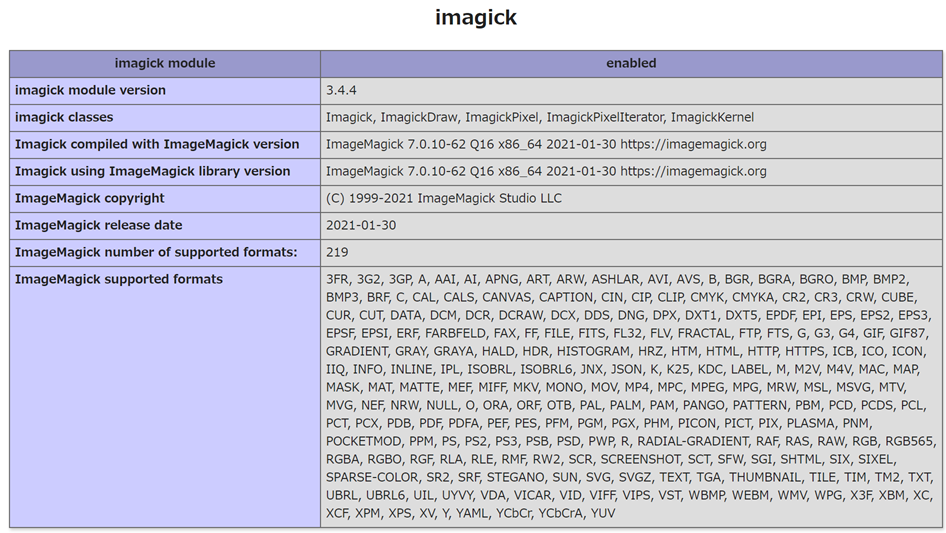
サイトヘルスステータスでも無事に消えました。